For Windows 10 / 11 · SSH · Telnet · Serial

TopBusiness PuTTY — your servers, one click away

The SSH and Telnet terminal you already know, from the TopBusiness team. Same windows and settings as PuTTY, opens your PuTTY saved sessions and keys on the first start, and comes with TopBusiness PuTTYgen to make and convert SSH keys, TopBusiness Pageant to keep your keys ready, TopBusiness PSFTP to copy files, and PSCP and Plink for the command line.

One installer: TopBusiness PuTTY, PuTTYgen, Pageant, PSFTP, PSCP and Plink
New — Web PuTTY for your phone, included with every licence →
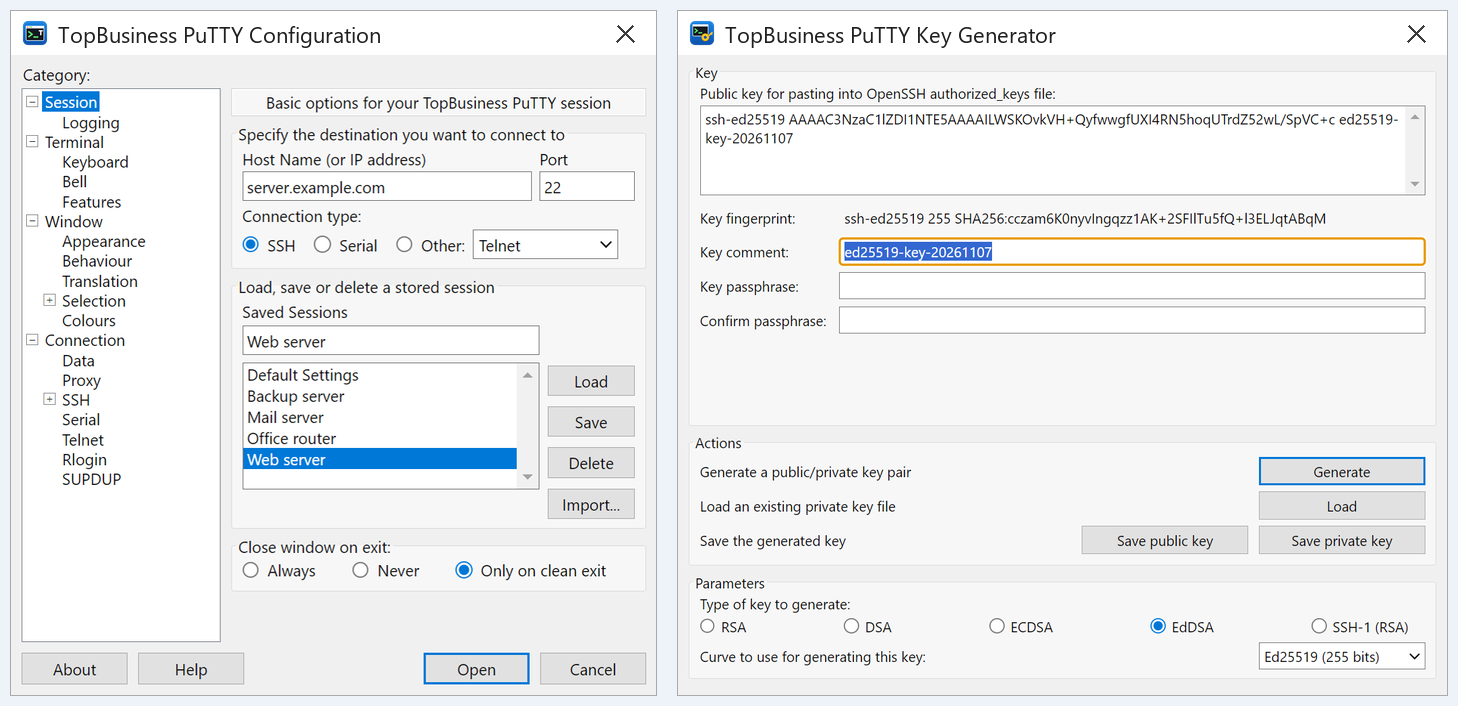
TopBusiness PuTTY configuration window and the TopBusiness PuTTYgen key generator

What it does

SSH, Telnet and more

SSH-2 with modern encryption, plus Telnet, Rlogin, Raw TCP and Serial (COM port) connections.

Your PuTTY sessions

Saved sessions and trusted server keys from PuTTY on the same PC are copied in automatically — nothing to set up again.

Every PuTTY setting

The same configuration pages: terminal, keyboard, colours, proxy, tunnels, X11, host keys, ciphers and the bug work-arounds.

Key login

Log in with PuTTY .ppk keys or OpenSSH keys, with or without a passphrase, or with keyboard-interactive and password.

Tunnels and proxies

Local, remote and dynamic (SOCKS) port forwarding, and connections through SOCKS, HTTP, Telnet or SSH jump proxies.

Safe prompts

Lines from the program itself carry the TopBusiness mark, so you know a password prompt is genuine and not from the server.

Session logging

Save what you see, or the raw data, to a log file named by date, time and host.

Quick from the Start menu

Recent sessions and the key generator right in the Windows Start menu and taskbar.

Built-in manual

A full help manual with a page for every setting — press Help on any page.

Key generator

TopBusiness PuTTYgen makes, opens and converts SSH keys in every common format.

Key agent

TopBusiness Pageant holds your keys next to the clock, so you type a passphrase once and log in everywhere.

File transfer

TopBusiness PSFTP copies files and whole folders to and from your servers over SFTP, with resume.

Works with your tools

Pageant also serves PuTTY, Plink, WinSCP and the Windows ssh command — no extra set-up.

Command line and scripts

TopBusiness PSCP and Plink copy files and run server commands from Command Prompt, PowerShell and scheduled batch files.

Web PuTTY included

Open your servers from the browser on a phone or tablet with the same licence code — see Web PuTTY below.
Web PuTTY — your servers from any phone

New: open your SSH servers from the browser on your phone, tablet or any computer — nothing to install. Web PuTTY is included with every TopBusiness PuTTY licence: one code for the App and the Web, at no extra cost.

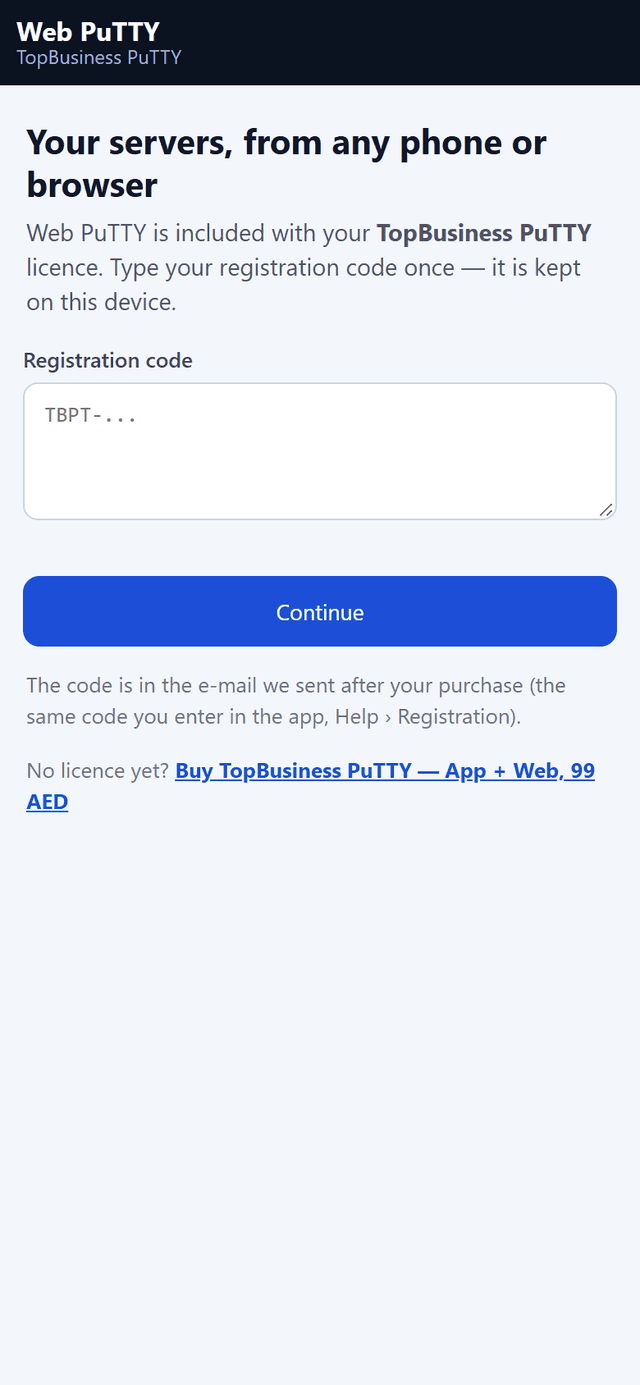
Web PuTTY on a phone: enter your TopBusiness PuTTY registration code once
1. Enter your code once
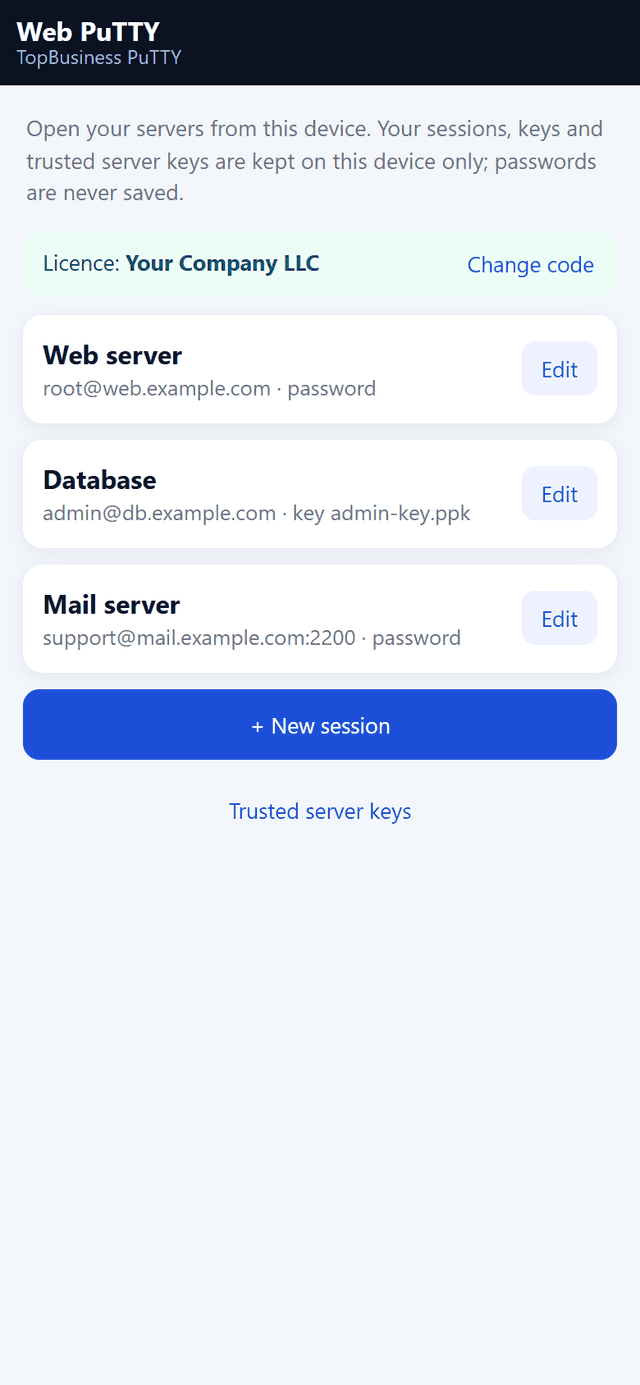
Web PuTTY on a phone: the list of saved servers
2. Save your servers
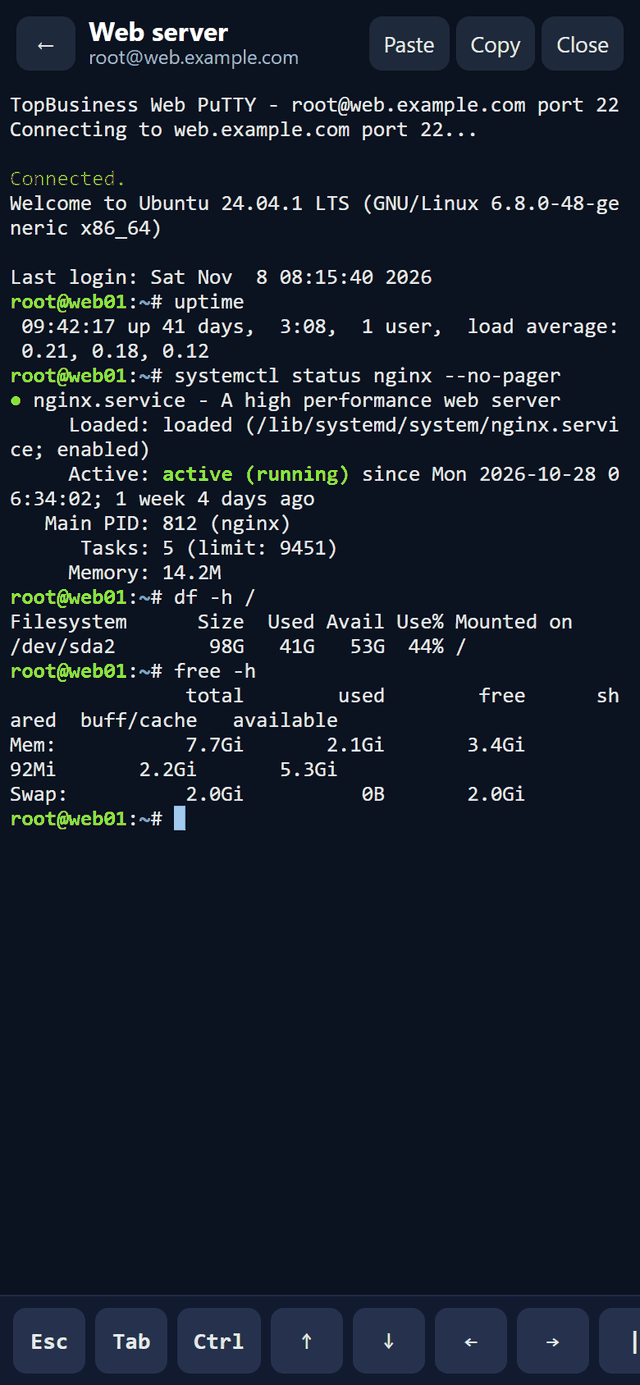
Web PuTTY on a phone: an SSH terminal connected to a Linux server
3. Work in the terminal
One licence — App + WebThe registration code you use in the Windows program also opens Web PuTTY.
  • Open app.topbusinesserp.com/putty-web and paste your code
  • Add it to your home screen — it opens like an app
  • Up to 2 Web PuTTY sessions at the same time
  • Included with every licence, no extra cost
Made for small screensA real terminal, with the keys a phone keyboard is missing.
  • Esc, Tab, Ctrl, arrows, Home / End and PgUp / PgDn buttons
  • Log in with a password, keyboard-interactive, or a .ppk or OpenSSH key
  • The server key is checked, just like in PuTTY
  • Sessions and keys stay on your device; passwords are never saved

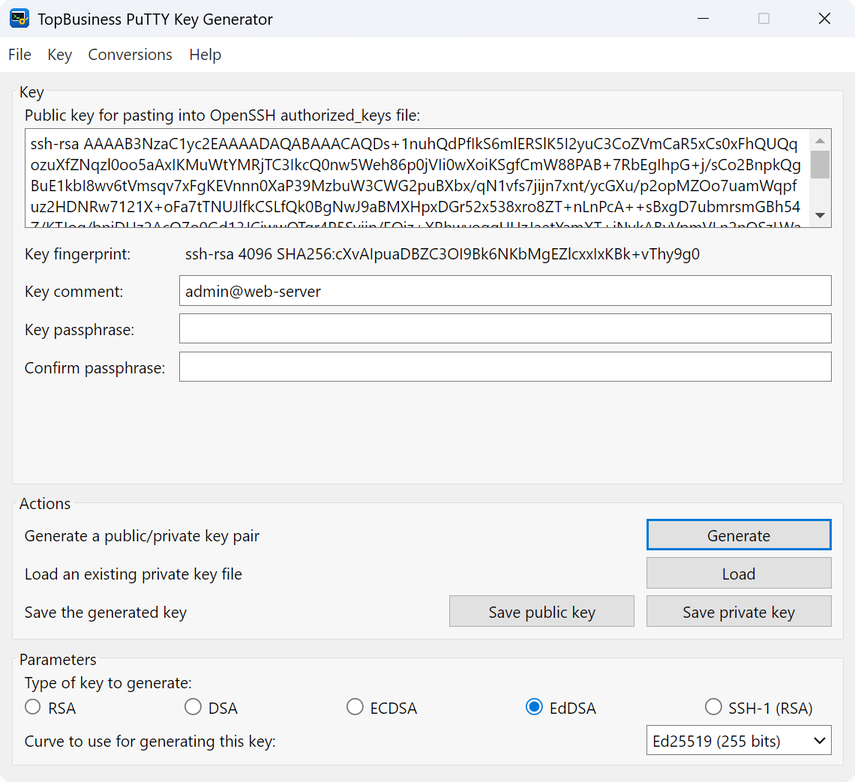
TopBusiness PuTTYgen — the key generator

TopBusiness PuTTYgen window with an RSA 4096 key loaded
Make SSH keysClick Generate and move the mouse — your new key is ready in a second.
  • RSA, DSA, ECDSA (p256, p384, p521)
  • EdDSA: Ed25519 and Ed448
  • SSH-1 RSA for very old servers
  • Passphrase protection with Argon2
Open and convert keysLoad a key, change its passphrase or comment, and save it in the format you need.
  • PuTTY .ppk (version 2 and 3)
  • OpenSSH (old PEM and new format)
  • ssh.com and PKCS#8
  • OpenSSH certificates; double-click a .ppk file to open it

TopBusiness Pageant — your keys, ready when you are

Type the passphrase oncePageant sits next to the clock and holds your keys while you work. Every new connection logs in by itself.
  • Add keys from the tray icon, the Key List or by starting Pageant with your .ppk files
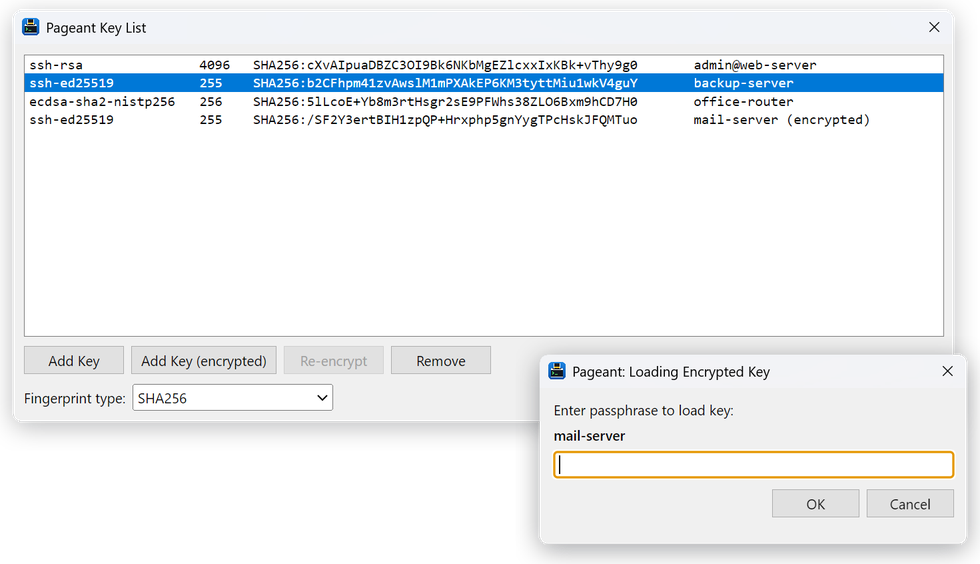
  • “Add Key (encrypted)” keeps a key locked until the first time a server asks for it
  • Re-encrypt locks keys again when you step away
  • Remove one key or all keys in one click
Works with everythingPageant answers on the same channel as PuTTY’s own Pageant.
  • TopBusiness PuTTY, PuTTY, Plink and WinSCP find it automatically
  • The Windows ssh and ssh-add commands can use it too
  • RSA, DSA, ECDSA, Ed25519 and Ed448 keys
  • Saved sessions open straight from the tray menu
TopBusiness Pageant Key List with four keys and the passphrase prompt for an encrypted key

TopBusiness PSFTP — copy files over SFTP

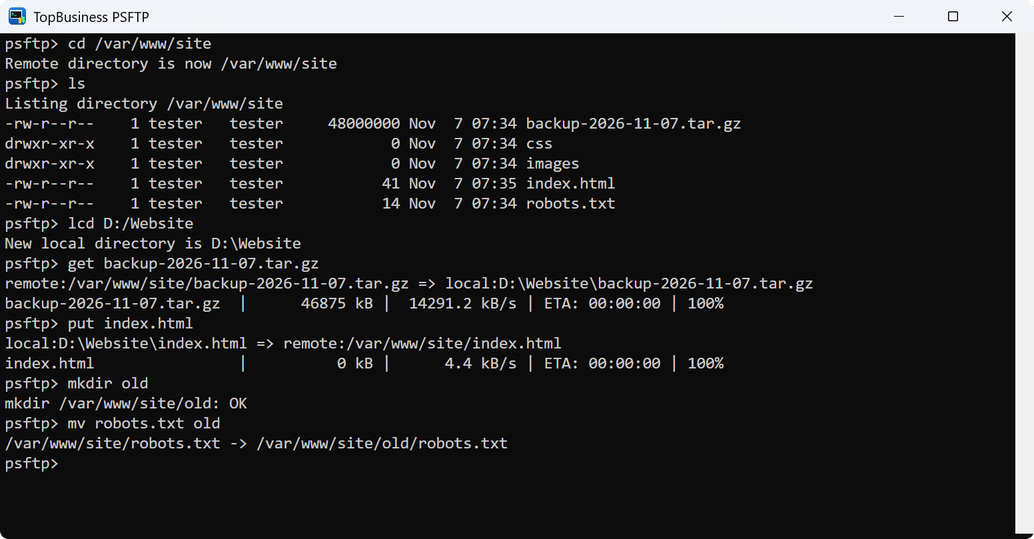
TopBusiness PSFTP console downloading a backup and uploading a web page
Simple commandsType open user@server and work with the same commands as PuTTY’s PSFTP.
  • get and put for files, -r for whole folders
  • mget / mput with wildcards such as *.log
  • reget / reput continue a copy that stopped
  • ls, cd, mkdir, mv, rm, chmod
Same login as PuTTYUses your saved sessions, keys, Pageant and the server keys you already trust.
  • Live progress with speed and time left; Ctrl+C stops a copy
  • Batch files (-b) to repeat the same transfers
  • Up and Down recall earlier commands

TopBusiness PSCP and Plink — for the command line

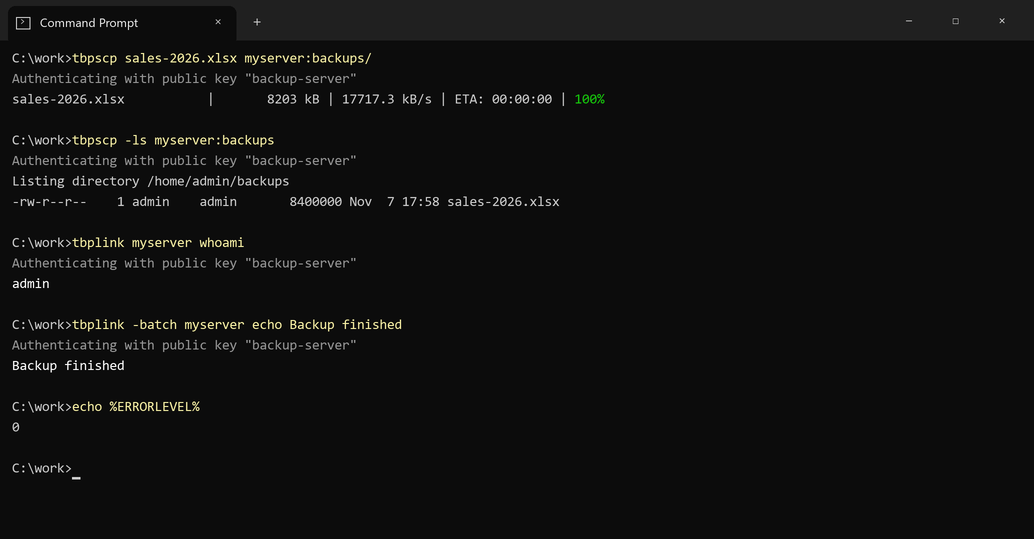
Command Prompt: TopBusiness PSCP uploads a file and lists the folder, TopBusiness Plink runs commands on the server
PSCP: copy in one lineUpload or download straight from Command Prompt, PowerShell or a batch file.
  • tbpscp report.xlsx myserver:backups/
  • Wildcards such as *.log, -r for whole folders, -p keeps dates
  • -ls lists a folder on the server
Plink: commands and tunnelsRun a command on the server, or a full session inside your console window.
  • tbplink myserver "systemctl restart app" returns the command’s exit code
  • -batch for scheduled jobs that must never wait for an answer
  • -L, -R, -D and -N keep tunnels open
Ready to useThe installer adds both to your PATH. They use your saved sessions, keys, Pageant and trusted server keys, and accept PuTTY’s PSCP and Plink options, so your existing scripts keep working.

Questions

I already use PuTTY. Do I lose anything?

No. TopBusiness PuTTY reads your PuTTY sessions and server keys but never changes them, so PuTTY keeps working as before. You can use both.

Do my .ppk keys work?

Yes. Choose the key on Connection › SSH › Auth › Credentials, exactly as in PuTTY. Keys made by TopBusiness PuTTYgen work in PuTTY too.

Where are my passwords kept?

Only on your PC. A saved password is encrypted with your Windows account. Your passwords, keys and sessions are never sent to TopBusiness.

Does the app send anything?

Once a day the app tells topbusinesserp.com that it is in use: app and version, trial or registered (with the licence name), Windows version, computer name and a random install number. No files, sites, passwords or browsing are sent.

I already run PuTTY’s Pageant. Can I use TopBusiness Pageant?

Only one Pageant can run at a time. If PuTTY’s Pageant is running, TopBusiness PuTTY simply uses it. To switch, exit PuTTY’s Pageant (right-click its icon next to the clock, Exit) and start TopBusiness Pageant.

How does the free trial work?

Install and use everything for 30 days, no sign-up needed. To keep using it after that, buy a licence below and enter the registration code in About › Registration. One code covers TopBusiness PuTTY, PuTTYgen, Pageant, PSFTP, PSCP and Plink on up to 4 computers.

Why type tbpscp and tbplink instead of pscp and plink?

Both names work. If PuTTY itself is also installed on the PC, typing pscp or plink may start PuTTY’s own tools, because Windows finds them first. tbpscp and tbplink always start the TopBusiness ones, with the same options.

Which Windows versions?

Windows 10 and Windows 11, 64-bit.

Does Web PuTTY cost extra?

No. Web PuTTY is included with every TopBusiness PuTTY licence at no extra cost — use the same registration code you entered in the program. The 30-day trial is for the Windows program; Web PuTTY opens with a bought licence.

Which servers can Web PuTTY open?

Servers that can be reached on the internet, by name or public IP address. Web PuTTY runs on the TopBusiness server, so it cannot reach addresses inside your office or home network (such as 192.168.x.x or 10.x.x.x) — use the Windows program for those.

Is Web PuTTY safe?

Your browser talks to TopBusiness over HTTPS, and from there an SSH connection goes to your server; the server key is checked just like in PuTTY. Passwords are never saved and what you type is not recorded. We keep a short connection log (time, licence and server name) to protect the service.

TopBusiness PuTTY is written by TopBusiness. Its windows and settings follow PuTTY by Simon Tatham, used under the MIT licence; see About › View Licence in the program. TopBusiness is not part of the PuTTY project.

Buy — one price, for life

One licence covers up to 4 computers, all six programs and Web PuTTY on your phone. Never pay for updates and upgrades again.

1 Your details2 Payment3 Your code by e-mail

Your details